
A data center is a physical facility that houses computer systems, servers, networking equipment, and storage infrastructure used to process, store, and distribute large amounts of data. Every time you send an email, stream a video, or open an app, a data center somewhere in the world is doing the heavy lifting behind the scenes.
It’s not just a room full of computers. It’s a carefully engineered environment built to keep systems running 24/7 without failure.
The Physical Reality Most People Never See
Walk into a data center and the first thing you notice is the noise. Rows of server racks hum constantly. Cold air blows hard from raised floors or overhead ducts. Blinking lights run down every rack. It looks nothing like what most people imagine.
These buildings are purpose-built. The walls are reinforced. The floors are raised to route cables and cooling air underneath. The ceilings are high to allow hot air to rise and get captured before it damages equipment. Everything has a reason.
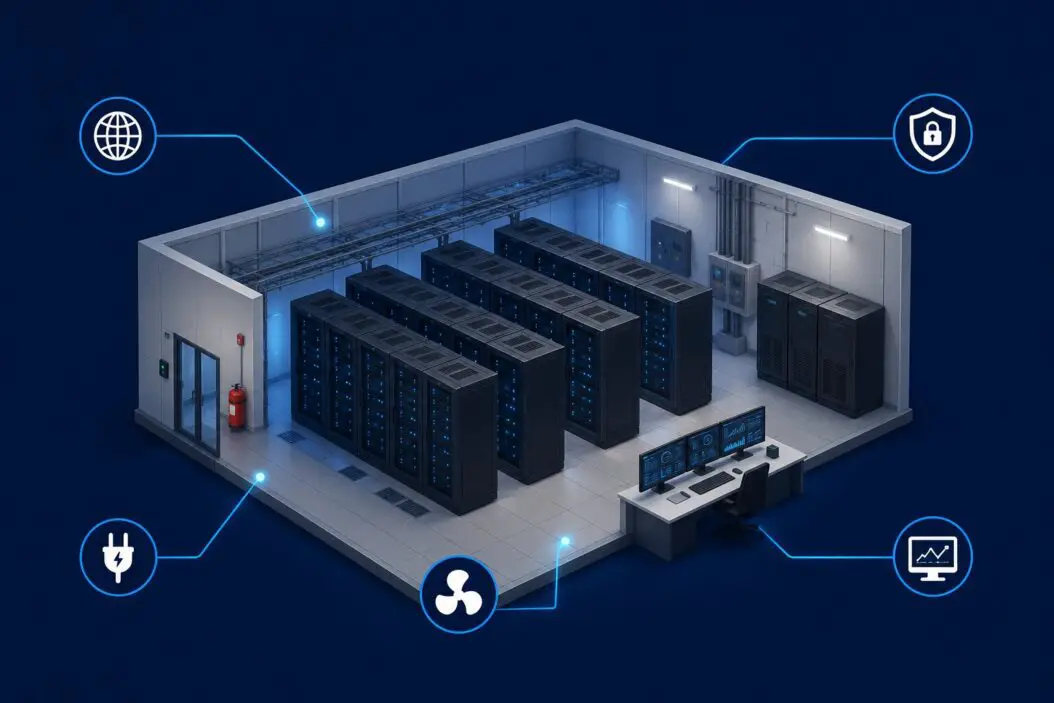
Here’s what physically lives inside a data center:
- Servers: The actual computing machines that run applications, websites, databases, and services
- Storage systems: Hard drives and solid-state drives that hold data persistently
- Networking equipment: Switches, routers, and firewalls that move data between systems and out to the internet
- Power infrastructure: Uninterruptible power supplies (UPS), backup generators, and power distribution units
- Cooling systems: Computer room air conditioners (CRACs), chillers, and in-row cooling units
- Security systems: Badge readers, biometric scanners, security cameras, and mantraps (double-door entry systems)
None of this is optional. Remove any one layer and the whole operation becomes unreliable.
How a Data Center Actually Works
Think of a data center like a city’s power grid, but for data. It has to supply energy constantly, manage heat, route traffic efficiently, and never go down.
Here’s the basic flow of what happens when you load a webpage:
- Your request travels from your device through the internet
- It hits a router at the data center’s edge
- The router sends it to the right server
- The server processes the request and pulls data from storage
- The response travels back through the same path to your screen
All of this happens in milliseconds. That speed depends entirely on how well the data center is designed and maintained.
Power: The Foundation of Everything
A data center consumes enormous amounts of electricity. A large hyperscale facility can use as much power as a small city. Power enters through utility feeds, gets conditioned through UPS systems, and distributes to every rack through power strips called PDUs (Power Distribution Units).
Most serious data centers run on redundant power. That means two separate utility feeds, plus backup diesel generators, plus UPS batteries that kick in during the milliseconds it takes the generators to spin up. The goal is zero downtime even during a grid failure.
Cooling: The Problem Nobody Talks About
Servers generate intense heat. A single server rack can produce 10 to 30 kilowatts of heat. Multiply that by hundreds of racks and you have a serious problem.
Cooling is often the biggest engineering challenge in data center design. Common approaches include:
- Hot aisle/cold aisle containment: Racks face alternating directions so hot exhaust air and cold intake air don’t mix
- Raised floor cooling: Cold air pumps up through floor tiles directly in front of server intakes
- Liquid cooling: Coolant runs through pipes directly to chips or into rear-door heat exchangers
- Free cooling: In cold climates, outside air or water is used to reduce mechanical cooling costs
In 2026, liquid cooling has moved from niche to mainstream, especially with the rise of GPU clusters for AI workloads that push heat density far beyond what traditional air cooling can handle.
Networking: Moving Data at Scale
Inside a data center, networking is its own discipline. Servers connect to top-of-rack switches. Those switches connect to aggregation switches. Those connect to core routers. Everything is redundant.
Speeds inside a modern data center run at 25, 100, or even 400 gigabits per second between switches. Fiber optic cables carry most of this traffic. The network architecture determines how fast data moves and how much traffic the facility can handle simultaneously.
Types of Data Centers
Not all data centers are the same. They vary by size, ownership, and purpose.
| Type | Who Owns It | Who Uses It | Examples |
|---|---|---|---|
| Enterprise | The company itself | Internal staff and apps | A bank’s private IT facility |
| Colocation (Colo) | A third party | Multiple businesses renting space | Equinix, Digital Realty |
| Cloud | Cloud providers | Anyone via subscription | AWS, Azure, Google Cloud |
| Edge | Telecom companies or operators | Apps needing low latency | Cell tower micro-DCs |
| Hyperscale | Big tech companies | Their own massive platforms | Meta, Microsoft, Amazon |
Enterprise data centers are on-site facilities owned by a single organization. A large hospital might run its own data center to keep patient records close and under direct control.
Colocation data centers rent out rack space, power, and cooling to multiple customers. You bring your own servers and plug in. You get the infrastructure without building it yourself.
Cloud data centers are what AWS, Azure, and Google Cloud run. You never see the physical hardware. You just consume compute and storage as a service.
Edge data centers are small facilities placed close to end users. They reduce latency for applications like gaming, video calls, and autonomous vehicles by processing data near the source rather than routing it to a distant central facility.
Hyperscale data centers are massive. We’re talking buildings the size of multiple football fields with hundreds of megawatts of power capacity. Companies like Meta and Microsoft build these to run their own platforms at global scale.
Data Center Tiers: What They Mean
The Uptime Institute developed a tiering system that classifies data centers by reliability. It’s widely used across the industry.
| Tier | Redundancy | Expected Uptime | Annual Downtime |
|---|---|---|---|
| Tier I | None | 99.671% | ~28.8 hours |
| Tier II | Partial | 99.741% | ~22 hours |
| Tier III | N+1 redundancy | 99.982% | ~1.6 hours |
| Tier IV | Fault tolerant | 99.995% | ~26 minutes |
Tier III is the most common for business-critical applications. Tier IV is reserved for operations where any downtime at all is unacceptable, like stock exchanges or defense systems.
N+1 redundancy means if you need N components to run, you have one extra on standby. Tier IV goes further: every component has a full backup system, and you can take any single component offline without any impact on operations.
Why Data Centers Exist (And Why They Matter More Now)
Before cloud computing, every company ran its own servers. That meant building server rooms, hiring IT staff to maintain them, and spending capital on hardware that depreciated fast. It was expensive and inefficient.
Data centers centralized that infrastructure. Instead of every company running their own small, inefficient setup, shared facilities could achieve economies of scale. Better power efficiency. Better cooling. Better physical security. Lower cost per unit of compute.
Today, data centers underpin everything digital. Your bank balance sits in a data center. Your medical records live there. The apps on your phone communicate with servers in data centers. Social media, ecommerce, streaming, email, cloud storage – none of it works without these facilities.
AI has made this even more critical. Training large language models requires thousands of GPUs running for weeks. That scale of compute only exists in data centers. The current wave of AI investment is driving a construction boom in data center capacity that’s unlike anything the industry has seen before. According to research from McKinsey, global data center capacity demand is expected to more than double by 2030.
Measuring Data Center Efficiency
The standard metric for energy efficiency in data centers is PUE: Power Usage Effectiveness.
PUE = Total Facility Power / IT Equipment Power
A PUE of 1.0 would mean 100% of power goes to the IT equipment with nothing wasted on cooling, lighting, or other overhead. That’s physically impossible. But the closer to 1.0, the better.
- PUE of 2.0 means you’re using as much power on overhead as on computing
- PUE of 1.5 is average
- PUE of 1.2 is good
- PUE below 1.2 is excellent
Google’s data centers averaged a PUE of around 1.10 in recent years, which is exceptional. They achieve this through advanced cooling techniques, custom hardware, and continuous optimization.
Physical Security in a Data Center
Data centers protect physical access as seriously as digital security. Getting into a data center typically requires:
- ID verification at the perimeter
- Biometric authentication at the main entrance
- Badge access at every zone within the facility
- Two-factor authentication for critical areas
- Video surveillance throughout
- Security personnel on-site at all times
Some facilities use mantraps: a small room between two doors where only one door can open at a time. You enter the first door, it locks behind you, your identity is verified, then the second door opens. It prevents tailgating.
Colocation customers typically get escorted to their cages by a data center staff member. You can’t just walk around freely.
Environmental Impact and Sustainability
Data centers are one of the largest consumers of electricity globally. This creates a real tension between the growing demand for digital services and the need to reduce carbon emissions.
The industry has responded in several ways:
- Renewable energy purchasing: Major cloud providers have committed to 100% renewable energy and purchase power purchase agreements (PPAs) with wind and solar farms
- Water-efficient cooling: Moving away from water-intensive evaporative cooling in water-stressed regions
- Waste heat recovery: Using heat exhaust from servers to heat nearby buildings, a practice more common in Europe
- Hardware efficiency improvements: Newer chips deliver more compute per watt than older generations
The challenge is that demand is growing faster than efficiency improvements. Building more efficient data centers is good, but if you’re building ten times as many, the net environmental impact still increases.
Microsoft, Google, and Amazon have all made public commitments around carbon neutrality and renewable energy. The Green Grid organization publishes industry standards and metrics for measuring and improving data center sustainability.
What Lives in a Data Center Rack
If you’ve never seen a server rack up close, here’s what’s typically inside:
A standard rack is 19 inches wide and comes in various heights measured in “rack units” (U). Each U is 1.75 inches. A full rack is typically 42U.
Inside a single rack you might find:
- 1U or 2U rack-mount servers stacked vertically
- A patch panel at the top for cable management
- A power distribution unit (PDU) running down the side
- A top-of-rack switch connecting servers to the network
- Blanking panels filling any empty space to control airflow
Everything is bolted in, labeled, and cabled with enough slack to pull a server without disrupting adjacent equipment. Good cable management isn’t just aesthetic. Messy cables block airflow and make maintenance slower.
How Data Centers Connect to the Internet
A data center doesn’t just plug into the internet like a home. It connects through internet exchanges and multiple tier-1 carriers simultaneously.
An internet exchange point (IXP) is a physical location where different networks interconnect. Data centers near major IXPs have lower latency and better redundancy because traffic can reach more networks with fewer hops.
Large facilities offer direct connections to dozens of carriers. This is called being “carrier-neutral.” Customers can connect to whichever internet service providers they want, negotiate better rates, and add redundancy by splitting traffic across multiple providers.
Data Centers vs. Server Rooms vs. Cloud
People use these terms interchangeably. They shouldn’t.
| Term | What It Actually Is |
|---|---|
| Server room | A closet or small room with a few servers. No redundancy, basic cooling. |
| Data center | A purpose-built facility with redundant power, cooling, and networking. |
| Cloud | Someone else’s data center that you access via software. |
A server room might work for a 10-person startup. A data center is what that startup needs when it starts serving millions of users. The cloud lets you skip building your own data center entirely by renting capacity from someone who already did.
Conclusion
A data center is the physical backbone of everything digital. It’s where computation actually happens: not in the cloud (which is just a metaphor), not in your app, but inside rows of servers in temperature-controlled, secure, redundant facilities built specifically to never fail.
Understanding what a data center is helps you understand why uptime matters, why latency varies by geography, why cloud services cost what they cost, and why the physical world still matters in a supposedly virtual economy.
Frequently Asked Questions
Can a small business run its own data center?
Technically yes, but it rarely makes financial sense. Building even a small, properly redundant data center requires significant capital for UPS systems, generators, cooling equipment, and physical security. Most small and medium businesses are better served by colocation or cloud services. You get enterprise-grade infrastructure without the capital expense or the operational burden of maintaining it yourself.
How much does it cost to build a data center?
Construction costs vary enormously depending on size and tier level. A modest 1 megawatt facility might cost $10 to $15 million to build. A hyperscale campus can run into billions. The bigger costs over time are operational: power, cooling, maintenance, and staffing. Power alone often represents 60 to 70 percent of ongoing operating expenses for a data center.
What happens when a data center loses power?
In a well-designed Tier III or Tier IV facility, you don’t notice anything. UPS batteries kick in within milliseconds, supplying clean power while generators spin up. Generators reach full power within 10 to 30 seconds and can run for days on diesel fuel. The goal is that no application or customer experiences any disruption at all. Lower-tier facilities with less redundancy may have brief outages during grid failures.
Why are so many data centers being built in specific locations?
Location decisions come down to four main factors: cheap and reliable power, available land, a stable climate (cooler is better for cooling costs), and connectivity to fiber networks. States like Virginia, Texas, and Oregon dominate in the US because they hit multiple criteria. Virginia specifically has become the largest data center market in the world due to its proximity to internet exchange points, tax incentives, and existing fiber infrastructure.
Is my personal data actually secure in a data center?
Physical security in a professional data center is typically far better than what any individual or small company can achieve on their own. The risk is rarely someone breaking in and stealing hard drives. The real risks are software vulnerabilities, account compromises, and misconfigured systems, none of which are solved by data center physical security. Your data being in a professional facility is generally a good thing. How that data is encrypted, accessed, and managed by the software layer on top is where the real security questions live.

- How to Find Screenshots on Windows 11/10: Check These Folders - June 17, 2026
- How to Send Encrypted Email in Outlook (Step-by-Step Guide) - June 17, 2026
- What Is a Data Center? Everything You Need to Know - June 17, 2026