
Your bank account, medical records, text messages, and work emails all share something critical: they need protection from anyone who shouldn’t see them. That’s where encryption and decryption come in.
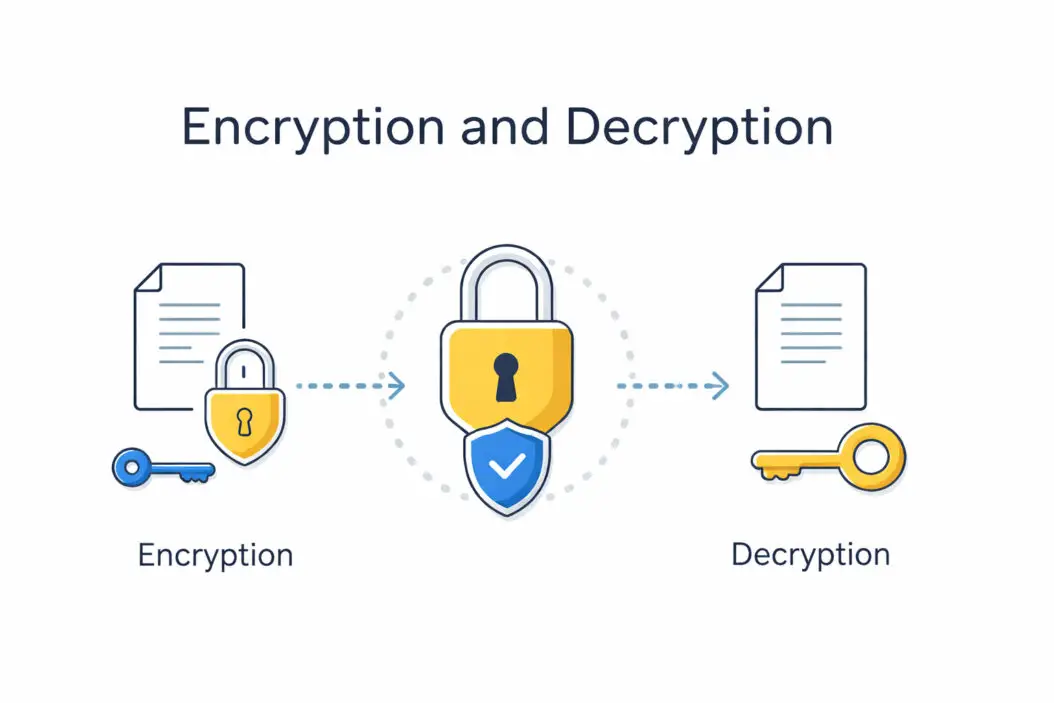
Here’s what these terms actually mean: Encryption scrambles your readable information into unreadable code. Decryption reverses this process, turning the scrambled code back into information you can read. Think of it like putting a letter in a locked box (encryption) and using a key to open it (decryption).
This article explains exactly how encryption and decryption work, why you need them, and how to use them to protect your information right now.
What Is Encryption?
Encryption transforms plain, readable data into scrambled text called ciphertext. Without the correct key, that scrambled text looks like random nonsense.
When you encrypt a file, message, or piece of data:
- The original information (called plaintext) goes through a mathematical process
- An algorithm uses an encryption key to scramble the data
- The output is unreadable ciphertext
- Only someone with the correct decryption key can reverse the process
Real example: When you send “Meet me at 3pm” through an encrypted messaging app, it might look like “X9$mK2#pL8@qR4” to anyone intercepting it.
What Is Decryption?
Decryption is the reverse process. It takes encrypted ciphertext and converts it back to readable plaintext using the correct key.
Here’s what happens:
- You receive or access encrypted data
- You apply the decryption key
- The algorithm reverses the encryption process
- You get back the original, readable information
The critical point: decryption only works with the right key. Wrong key, no access.
How Encryption and Decryption Work Together
These two processes form a complete security system. Neither works alone.
The basic flow:
- You create information (a document, message, or file)
- Encryption protects it during storage or transmission
- The recipient or authorized user decrypts it to read it
- Unauthorized people only see scrambled nonsense
This happens millions of times per second across the internet. Every time you visit a website with “https” in the URL, encryption and decryption protect your connection.
Types of Encryption You Need to Understand
Two main types handle different security needs.
Symmetric Encryption
One key does both jobs: encrypting and decrypting.
How it works:
- You and the recipient share the same secret key
- That key encrypts the data
- The same key decrypts it
- Fast and efficient for large amounts of data
Common uses:
- File encryption on your computer
- Database encryption
- Full disk encryption (like BitLocker or FileVault)
The problem: You need to securely share the key first. If someone intercepts the key, they can decrypt everything.
Popular symmetric algorithms: AES (Advanced Encryption Standard), ChaCha20, Blowfish
Asymmetric Encryption
Two different keys work as a pair: a public key and a private key.
How it works:
- Everyone has two mathematically linked keys
- Your public key (which you can share freely) encrypts data
- Only your private key (which you keep secret) can decrypt it
- Or: your private key can encrypt, and anyone with your public key can decrypt (digital signatures)
Common uses:
- Secure email
- SSL/TLS certificates for websites
- Digital signatures
- Cryptocurrency transactions
The advantage: You never need to share your private key. You can publish your public key everywhere.
Popular asymmetric algorithms: RSA, ECC (Elliptic Curve Cryptography), Diffie-Hellman
Real-World Encryption and Decryption Examples
Understanding abstract concepts helps, but seeing actual applications makes it click.
Your Phone’s Storage
When you set a passcode on your iPhone or Android device, the phone encrypts everything stored on it. Your passcode helps generate the decryption key. Without it, the phone’s data stays scrambled and useless.
WhatsApp Messages
WhatsApp uses end-to-end encryption:
- Your message gets encrypted on your device
- It travels across the internet as ciphertext
- Only the recipient’s device can decrypt it
- Not even WhatsApp can read your messages
Online Shopping
When you enter credit card information on Amazon:
- Your browser establishes an encrypted connection (HTTPS/TLS)
- Your card details get encrypted before leaving your computer
- They travel encrypted across the internet
- Amazon’s servers decrypt them in a secure environment
- The stored version stays encrypted in their database
Email Encryption
Standard email travels unencrypted (readable by anyone in the path). Encrypted email tools like ProtonMail or PGP:
- Encrypt the message before it leaves your computer
- Keep it encrypted during transmission
- Only decrypt it when the recipient opens it with their key
Encryption Strength: What Makes It Secure?
Not all encryption offers equal protection. Strength depends on several factors.
Key Length
Longer keys create more possible combinations, making brute-force attacks (trying every possible key) impractical.
| Key Length | Security Level | Use Case |
|---|---|---|
| 128-bit | Strong for most uses | Standard AES encryption |
| 256-bit | Very strong | Military-grade, highly sensitive data |
| 2048-bit | Strong (asymmetric) | Standard RSA encryption |
| 4096-bit | Very strong (asymmetric) | High-security RSA applications |
A 256-bit key has 2^256 possible combinations. That’s more combinations than atoms in the observable universe.
Algorithm Quality
Some algorithms have mathematical weaknesses. Use only well-tested, modern algorithms:
Good choices in 2026:
- AES (symmetric)
- ChaCha20 (symmetric)
- RSA with 2048+ bits (asymmetric)
- ECC/Ed25519 (asymmetric)
Avoid these outdated options:
- DES (broken since the 1990s)
- RC4 (multiple weaknesses)
- MD5 hashing (not encryption, but often confused)
Implementation Matters
Even strong encryption fails if implemented poorly. Use established, audited tools rather than creating your own encryption system.
How to Use Encryption and Decryption Right Now
You don’t need technical expertise to protect your data. Here are practical steps.
Encrypt Files on Your Computer
Windows (BitLocker):
- Right-click your drive in File Explorer
- Select “Turn on BitLocker”
- Choose how to unlock (password or smart card)
- Save your recovery key somewhere safe
- Let encryption complete
Mac (FileVault):
- Open System Settings > Privacy & Security
- Click FileVault
- Turn it on
- Save your recovery key
- Restart when prompted
Cross-platform (VeraCrypt):
- Download VeraCrypt (free, open-source)
- Create an encrypted container or encrypt an entire drive
- Mount it when needed, enter password to decrypt
- Unmount when finished to re-encrypt
Encrypt Individual Files
For specific files rather than entire drives:
7-Zip (Windows):
- Right-click file > 7-Zip > Add to archive
- Enter a strong password
- Choose AES-256 encryption
- Create archive
Built-in tools (Mac):
- Open Disk Utility
- File > New Image > Image from Folder
- Choose folder with files
- Set encryption to 256-bit AES
- Create password
Cryptomator (all platforms):
- Install Cryptomator
- Create a vault (encrypted folder)
- Set password
- Add files to vault
- Lock when done
Encrypt Email
ProtonMail:
- Create free account at ProtonMail
- Emails between ProtonMail users automatically encrypt
- Send encrypted emails to anyone using password protection
PGP/GPG with regular email:
- Install GPG software (Gpg4win for Windows, GPG Suite for Mac)
- Generate your key pair
- Share your public key
- Use email client plugin (like Enigmail) to encrypt messages
Encrypt Messaging
Switch to apps with end-to-end encryption:
- Signal (recommended by security experts)
- iMessage (Apple devices only)
- Telegram (secret chats only)
Regular SMS and most social media messages are not encrypted.
Encrypt Cloud Storage
Cloud services encrypt data, but they hold the keys. For zero-knowledge encryption (only you have the key):
Cryptomator with any cloud service:
- Install Cryptomator
- Create vault in Dropbox/Google Drive/OneDrive folder
- Add files to vault through Cryptomator
- Files sync encrypted to cloud
- Decrypt on other devices with Cryptomator and password
Common Encryption Mistakes to Avoid
Even with tools available, people make errors that compromise security.
Using Weak Passwords
Your encryption is only as strong as your password. “password123” protecting 256-bit encryption is like using a paper lock on a titanium vault.
Create strong passwords:
- At least 16 characters
- Mix letters, numbers, symbols
- Use a passphrase: “Correct-Horse-Battery-Staple” style
- Use a password manager to generate and store them
Not Backing Up Decryption Keys
Lose your encryption key, lose your data forever. No recovery.
Protect yourself:
- Write down recovery keys and store them securely
- Use a password manager with strong master password
- Consider a hardware security key for critical keys
Encrypting Without a Threat Model
Encryption adds complexity. Understand what you’re protecting and from whom.
Ask yourself:
- What data needs protection?
- Who are you protecting it from? (Hackers? Government? Employer?)
- What’s your risk level?
Don’t encrypt everything mindlessly, but do protect sensitive information.
Trusting Encryption Alone
Encryption protects data at rest and in transit. It doesn’t protect against:
- Keyloggers recording your password
- Malware on your device
- Social engineering attacks
- Shoulder surfing
Use encryption alongside other security practices: antivirus software, secure passwords, awareness of phishing attacks, and according to the National Institute of Standards and Technology (NIST), regular software updates.
How Hackers Try to Break Encryption
Understanding attacks helps you defend better.
Brute Force Attacks
Try every possible key until finding the right one. Modern encryption makes this impractical (would take billions of years), but weak passwords make it feasible.
Man-in-the-Middle Attacks
Intercept communication between two parties and trick them into using compromised encryption. HTTPS/TLS prevents this for web browsing.
Side-Channel Attacks
Extract information by analyzing physical implementation: power consumption, electromagnetic leaks, timing information. Primarily concerns governments and sophisticated attackers.
Exploiting Implementation Flaws
Most successful attacks target bugs in software rather than breaking the math. Keep software updated.
Rubber-Hose Cryptanalysis
A fancy term for forcing you to reveal your password through threats or legal pressure. Technical encryption can’t protect against this.
The Future of Encryption in 2026 and Beyond
Encryption continues evolving to meet new threats.
Quantum Computing Threat
Quantum computers could potentially break current asymmetric encryption (like RSA) by solving mathematical problems much faster than classical computers.
Current status in 2026:
- Quantum computers exist but aren’t yet powerful enough
- Post-quantum cryptography standards are being developed
- NIST has selected algorithms resistant to quantum attacks
- Gradual migration to quantum resistant algorithms is beginning
Homomorphic Encryption
This allows computation on encrypted data without decrypting it first. Process sensitive information while keeping it encrypted throughout.
Current applications:
- Cloud computing with sensitive data
- Privacy-preserving data analysis
- Medical research on encrypted patient data
Zero-Knowledge Proofs
Prove you know something without revealing the information itself. Verify identity or data without exposing underlying details.
Growing uses:
- Blockchain and cryptocurrency privacy
- Anonymous credential systems
- Privacy preserving authentication
Legal and Ethical Considerations
Encryption exists in a complex legal landscape.
Encryption Is Legal
In most democratic countries, using encryption is perfectly legal. You have the right to protect your data.
Backdoors and Government Access
Some governments want “backdoors” in encryption for law enforcement access. Security experts nearly universally oppose this because:
- Backdoors create vulnerabilities hackers can exploit
- You can’t create a backdoor only good guys can use
- Weakened encryption harms everyone’s security
Export Controls
Strong encryption was historically classified as a weapon. While mostly relaxed today, some restrictions remain on exporting certain encryption technologies.
Required Disclosure
In some jurisdictions, you may be legally compelled to provide encryption keys or passwords. Laws vary by country and situation.
For more detailed information on encryption standards and best practices, visit the Electronic Frontier Foundation’s guide to encryption at https://www.eff.org.
Choosing the Right Encryption for Your Needs
Different situations call for different approaches.
Personal Files at Home
Best choice: Full disk encryption (BitLocker, FileVault, or VeraCrypt)
Why: Protects everything if device is lost or stolen. Transparent after initial setup.
Sharing Files with Others
Best choice: Encrypted zip/7z files with strong password, or encrypted cloud storage
Why: Recipient doesn’t need special software. Password can be shared through separate channel.
Business Communications
Best choice: End-to-end encrypted messaging (Signal, encrypted email) or enterprise-grade encryption tools
Why: Protects confidential business information and client data.
Cloud Backup
Best choice: Client-side encryption before upload (Cryptomator, Boxcryptor, or services like Tresorit)
Why: Cloud provider can’t access your data even if breached or compelled by authorities.
Mobile Devices
Best choice: Enable device encryption (on by default for modern iOS and Android)
Why: Phones contain enormous amounts of personal data and are easily lost.
Encryption Performance Impact
Encryption requires computational resources. Understanding the impact helps you make informed choices.
Modern devices handle encryption well:
- Current processors have built-in encryption acceleration
- Full disk encryption typically shows less than 5% performance impact
- File encryption is nearly instantaneous for most files
- Web browsing over HTTPS adds negligible delay
When you might notice impact:
- Very old computers without hardware acceleration
- Encrypting or decrypting very large files (hundreds of GB)
- Extremely resource-limited devices
For nearly all users in 2026, encryption performance concerns are minimal.
Verifying Encryption Is Actually Working
Don’t assume encryption is active. Verify it.
Check File Encryption
Try opening an encrypted file without providing the password. You should see garbage data or an error.
Check Disk Encryption
Windows BitLocker:
- Open BitLocker settings
- Status shows “BitLocker on”
Mac FileVault:
- System Settings > Privacy & Security > FileVault
- Shows “FileVault is turned on”
Check Website Encryption
Look for the padlock icon in browser address bar. Click it to see certificate details. Connection should show as “secure” using TLS.
Check Messaging Encryption
Signal: Every conversation shows a safety number. Verify numbers match with recipient.
WhatsApp: Tap contact name > Encryption to see QR code and verify.
Use Online Tools
Services like SSL Labs’ SSL Server Test (https://www.ssllabs.com/ssltest/) check website encryption strength.
Conclusion
Encryption and decryption form the foundation of digital security in 2026. These processes protect your data whether stored on devices, transmitted across networks, or backed up to the cloud.
Key takeaways:
Encryption scrambles data into unreadable form using mathematical algorithms and keys. Decryption reverses the process, restoring readable data only with the correct key.
Symmetric encryption uses one key for both operations; it’s fast and efficient. Asymmetric encryption uses paired public and private keys; it’s more flexible for communications.
You can implement encryption today using built-in tools on your devices, free software like VeraCrypt, and encrypted messaging apps like Signal.
Strong encryption combined with good password practices and security awareness provides robust protection for your digital life. The technology works, the tools are available, and implementation is straightforward.
Don’t wait for a data breach or stolen device to start protecting your information. Enable encryption now on your devices, use encrypted communication channels, and understand what you’re protecting and why.
Your data has value. Encryption ensures only authorized people can access it.
Frequently Asked Questions
Can encrypted data be hacked?
Properly implemented modern encryption (like AES-256) cannot be practically broken by current technology. Hackers typically exploit weak passwords, software vulnerabilities, or trick users rather than breaking the encryption mathematics directly. Your encrypted data remains secure as long as you use strong passwords, keep software updated, and protect your encryption keys.
Does encryption slow down my computer?
Modern computers experience minimal performance impact from encryption. Full disk encryption typically causes less than 5% slowdown, often unnoticeable in daily use. Current processors include hardware acceleration specifically for encryption operations, making the process efficient. Older devices without these features may experience more noticeable impact.
What happens if I forget my encryption password?
You permanently lose access to the encrypted data. This is by design; no password recovery backdoor exists in strong encryption. Always save recovery keys in secure locations when setting up encryption. Write them down physically and store in a safe place, use a password manager, or both. There is no password reset option with proper encryption.
Is free encryption software safe to use?
Yes, many free encryption tools are excellent and safe. Open-source options like VeraCrypt, GPG, and Signal undergo extensive security audits by experts worldwide. Open-source code allows anyone to verify there are no backdoors or vulnerabilities. Stick to well-known, actively maintained projects with strong reputations in the security community rather than obscure or proprietary free tools.
Should I encrypt my emails?
Encrypt email if you send sensitive information like financial data, medical records, legal documents, or confidential business communications. Standard email travels unencrypted and can be read by email providers, internet service providers, and anyone intercepting the connection. For casual conversations, encryption may be unnecessary, but for anything you wouldn’t want public, use encrypted email through services like ProtonMail or PGP encryption with regular email.

- How to Fix Overscan on Windows 11/10: Stop Your Screen Getting Cut Off (2026) - April 1, 2026
- How to Disable Lock Screen on Windows 11/10 in 2026 - April 1, 2026
- Top 7 NFT Integration Ideas for Brands in 2026 - March 31, 2026